Minimal interface
A single screen, a few essential actions. Nothing to hunt for, nothing to set up, no menu to get lost in.
A clean home screen, a few big buttons, nothing to throw them off. Call a loved one, see the family photos, send a word by voice: your parent manages on their own, with dignity — no manual, no fear of getting it wrong.
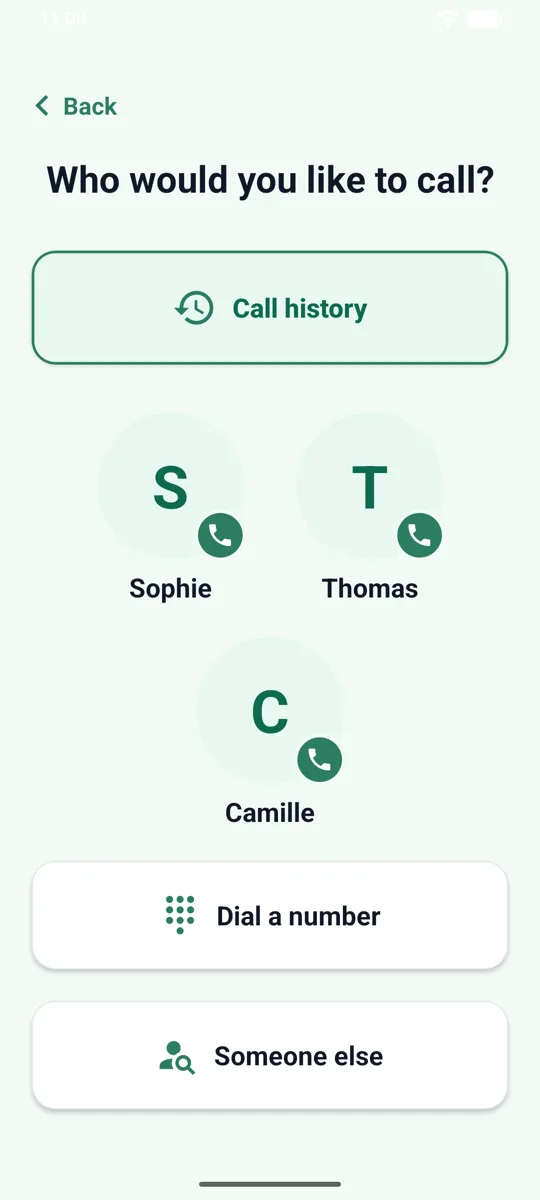
Provided by SeniorHub Simple launcher, the companion app you install on their phone.
Every detail is there to reassure, not to impress.
A single screen, a few essential actions. Nothing to hunt for, nothing to set up, no menu to get lost in.
Large, high-contrast targets with a clear word and an icon. You see it, you understand it, you press it.
No piling-up notifications, no pointless choices. One thing at a time, always in the same place.
One button to dictate a word to the caregivers — when writing is hard, the voice is enough.
We removed everything that confuses: the menus, the settings, the feeds. What’s left is a calm home with big buttons, always the same, always in the same place. Your loved one finds their bearings and acts on their own.
When typing becomes a chore, your loved one presses a single button and speaks. Their message goes straight to the household’s caregivers — a request, some news, a simple hello. They stay in charge of their day, without depending on anyone to be heard.
Behind the simplicity, the whole family is there. One press is enough to call a loved one by their first name, and whatever they send lands on the caregivers’ side in the full app. Simplicity for them, the full picture for you.
You install it yourself, in a few minutes: SeniorHub Simple launcher downloads from Google Play. Their phone or tablet has to run Android — this companion app does not exist on iPhone or iPad. Your own app, the caregivers one, is on both stores.
Google PlayAndroid only
Create your household in minutes, for free.