All in one place
One binder for the household: insurance, invoices, contracts, warranties. No more papers scattered across several homes.
The insurance certificate, the boiler invoice, the tenancy agreement: no more rummaging through drawers. Everything is scanned, filed in the household binder, and found in seconds — by everyone who needs it.
Built to be fast, with nothing to file by hand.
One binder for the household: insurance, invoices, contracts, warranties. No more papers scattered across several homes.
Take a photo of a paper: SeniorHub straightens it, cleans it up and files it as a PDF. No scanner, no computer.
Type “insurance” or “tenancy”: the right document surfaces at once, next to your notes and appointments.
Each relative sees what they should. Living-room tablets stay read-only, never more access than needed.
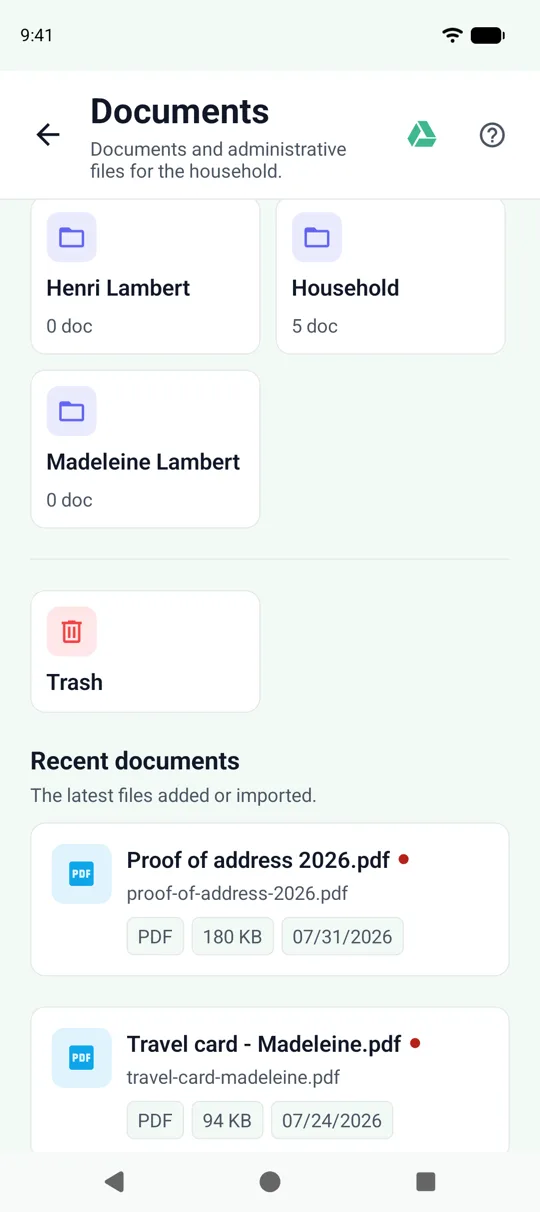
Everything lives in “Household”: the shared household folder, with sub-folders if you like. Whatever you delete goes to the Trash, where you can pull it back. No maze of a tree — just enough to find your way.
Lay the sheet on the table, frame it, and it’s done. SeniorHub detects the edges, corrects the perspective and already suggests a name and a folder. You confirm, it’s filed.
Link a Google Drive folder to the household: documents added in SeniorHub show up there, and those dropped into the folder surface in the app. A hybrid deposit, no double entry — and you stay in control of what’s shared.
Create your household in minutes, for free.